

このサンプルプログラムは以前に紹介した「サンプル じゃんけんゲーム(switch版)」を改善したものだ。
ストーリーは同じであり,画面へ表示される文字や入力する文字,タイミングは変わっていない。変わったのは,プログラムのコードである。
大きく改善されたのは,switch文を使わなくなったことである。判定が審判を表すクラスから手の形を持つオブジェクトに任されるようになった。また,判定結果に従って表示される文字列も,審判クラスから判定結果を表すクラスに移された。判定結果などのオブジェクトの状態が変数の値ではなくて,オブジェクトそのものになったのである。
さっそく,実際のサンプルプログラムを見てみよう。
目次
じゃんけんゲームのクラス
クラスがたくさんあるので,整理しておこう。次のようなクラスある。これらのクラスのオブジェクトが,ScissorsPaterStoneGameクラスの中で実行されるゲームの状況に応じて作られていく。
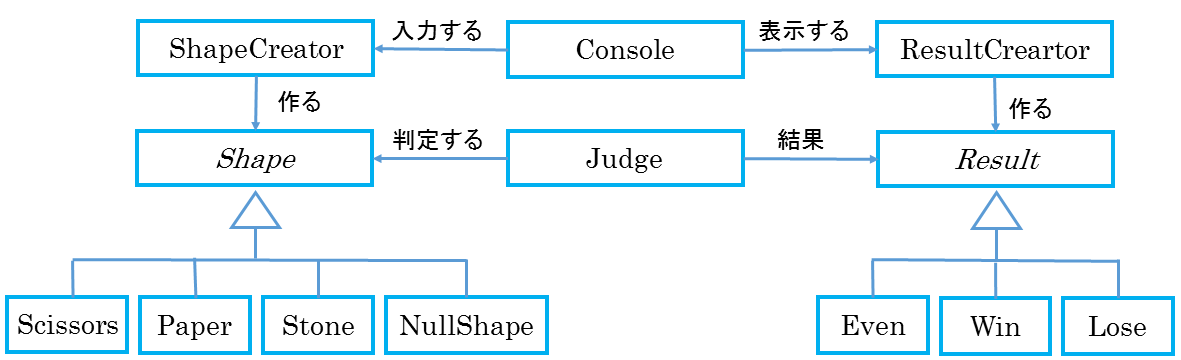
- ScissorsPaterStoneGameクラス:ゲームのストーリーを実行する。
- Shapeクラス:じゃんけんする二人の手を表す抽象クラスである。
- Stone, Scissors, Paper, NullShapeクラス:Shapeクラスの具象クラスである。
- ShapeCreatorクラス:Shapeクラスのサブクラスのオブジェクトを作る。
- Judgeクラス:審判を表す。
- Resultクラス:判定の結果を表す抽象クラスである。
- Even, Win, Loseクラス:Resultクラスの具象クラスである。
- ResultCreatorクラス:Resultクラスのサブクラスのオブジェクトを作る。
- Consoleクラス:画面の表示と入力を行うためのクラスである。また,タイマー機能も持っている。
サンプルプログラム
ScissorsPaterStoneGameクラス
このクラスは,ゲームに登場するオブジェクトをストーリーに従って呼び出し,じゃんけんゲームを実行する。
import java.util.Random;

public class ScissorsPaterStoneGame {
    public static void main(String[] args) {//[1]
        Shape shapeOfMyHand = new Shape();//[2]
        Shape shapeOfYourHand = new Shape();//[3]
        Judge judge = new Judge(shapeOfYourHand, shapeOfMyHand);//[4]
        Random random = new Random();//[5]

        judge.displayIntroduction();//[6]
        while (true) {//[7]
            int inputCharacter = Console.read();//[8]
            shapeOfYourHand.convertKeyToShape(inputCharacter);//[9]
            if (shapeOfYourHand.hand() == Shape.CANNOT_CONVERT)//[10]
                return;//[11]
            judge.sayCueWord();//[12]
            shapeOfMyHand.randomizeShape(random);//[13]
            judge.judge();//[14]
            judge.sayResult();//[15]
            Console.sleep(2);//[16]
        }
    }
}
説明
それでは簡単にプログラムの解説をしてゆこう。
- [1] mainメソッドの定義,ここからゲームが始まる。
- [2]-[5] ゲームの中に登場するオブジェクトと作る。作られたオブジェクトは,shapeOfMyHand:コンピュータ側の手の形,shapeOfmyHand:入力された手の形,judge:審判,random:乱数である。
- [6] ゲームの説明を表示する。
- [7] ループの始まり。
- [8] コンソールから文字を入力する。
- [9] 入力文字をshapeOfYourHandオブジェクトの手の形に変換する。
- [10]-[11] 手の形が「ぐう」,「ちょき」,「ぱー」以外の文字が入力されたら終了する。
- [12] 審判がじゃんけんの開始の合図をする。
- [13] 乱数からコンピュータ側の手の形を決める。
- [14] 審判が判定を行う。
- [15] 審判が判定結果を発表する。
- [16] 2秒休み,ループの先頭に戻る。
Shapeクラス
このクラスは,ゲームを行う人の手の形を表している抽象クラスである。このクラスのサブクラスとして,「ぐう」,「ちょき」,「ぱー」の手の形がある。
public abstract class Shape {//[1]
    public abstract String toString();//[2]
    public abstract boolean isKey(int key);//[3]
    public abstract Result judge (Shape shape);//[4]
}
説明
- [1] クラスを定義する。
- [2] 形を表現した文字列を戻すメソッドを定義する。
- [3] 入力文字のコードに対応しているかを判定する。
- [4] 判定を行う。
Stoneクラス
Stoneクラスは,Shapeクラスの抽象メソッドを実装した具象クラスであり,「ぐう」を表現している。
public class Stone extends Shape {
    int key;
    public Stone (int key) {
        this.key = key;
    }
    public boolean isKey(int key) {
        return (this.key == key);
    }
    public String toString() {
        return "ぐう";
    }
    public Result judge (Shape shape) {
        if (shape instanceof Scissors)
            return new Win();
        if (shape instanceof Paper)
            return new Lose();
        return new Even();
    }
}
Scissorsクラス
Scissorsクラスは,Shapeクラスの抽象メソッドを実装した具象クラスであり,「ちょき」を表現している。
public class Scissors extends Shape {
    int key;
    public Scissors (int key) {
        this.key = key;
    }
    public boolean isKey(int key) {
        return (this.key == key);
    }
    public String toString() {
        return "ちょき";
    }
    public Result judge (Shape shape) {
        if (shape instanceof Paper)
            return new Win();
        if (shape instanceof Stone)
            return new Lose();
        return new Even();
    }
}
Paperクラス
Paperクラスは,Shapeクラスの抽象メソッドを実装した具象クラスであり,「ぱー」を表現している。
public class Paper extends Shape {
    int key;
    public Paper (int key) {
        this.key = key;
    }
    public boolean isKey(int key) {
        return (this.key == key);
    }
    public String toString() {//60]
        return "ぱあ";//67]
    }
    public Result judge (Shape shape) {
        if (shape instanceof Stone)
            return new Win();
        if (shape instanceof Scissors)
            return new Lose();
        return new Even();
    }
}
NullShapeクラス
NullShapeクラスは,Shapeクラスの抽象メソッドを実装した具象クラスであり,入力キーがどの手の形にも対応していない場合を表現している。
public class NullShape extends Shape {
    public boolean isKey(int key) {
        return false;
    }
    public String toString() {//60]
        return "Null";//67]
    }
    public Result judge (Shape shape) {
        return new Lose();
    }
}
ShapeCreatorクラス
このクラスは,手の形のオブジェクトを作るクラスを表している。
import java.util.Random;

public class ShapeCreator {//[1]
    private static final int KEY_G = 103;//[2]
    private static final int KEY_C = 99;//[3]
    private static final int KEY_P = 112;//[4]
    private static Random random;//[5]
    private static Shape[] shapes;//[6]
    public static void initialize() {//[20]
        random = new Random();//[21]
        shapes = new Shape[4];//[22]
        shapes[0] = new Paper(KEY_P);//[23]
        shapes[1] = new Scissors(KEY_C);//[[24]
        shapes[2] = new Stone(KEY_G);//[25]
        shapes[3] = new NullShape();//[26]
    }
    public static Shape createRandomShape() {//[40]
        int index = random.nextInt(3);//[41]
        return shapes[index];//[42]
    }
    public static Shape createShapeByKey(int inputKey) {//[60]
        int keyCode = toLowerKey(inputKey);//[61]
        for (Shape shepe : shapes) {//[62]
            if (shepe.isKey(keyCode)) {//[63]
                return shepe;//[64]
            }
        }
        return shapes[shapes.length - 1];//[64]
    }
    private static int toLowerKey(int keyCode) {//[80]
        if (keyCode < KEY_C) {//[81]
            return keyCode + 32;//[82]
        }
        return keyCode;//[83]
    }
}
説明
- [1] クラスを定義する。
- [2]-[4] キーコードに対応した定数を定義する。
- [5]-[6] 変数を定義する。
- [20]-[26] コンストラクタにより初期値を設定する。
- [40] メソッドcreateRandomShapeを定義する。
- [41]-[42] ランダムに手の形を作る。
- [60] メソッドcreateShapeByKeyを定義する。
- [61]-[63] キーコードから手の形を作る。
- [80] メソッドtoLowerKeyを定義する。
- [81]-[83] 文字コードを小文字に変換する。
Judgeクラス
このクラスは,審判を表している。この審判を表すオブジェクトは,ゲームの進行に伴って指示を行い,判定を下す。
public class Judge {//[1]
    private Result result;//[2]
    Shape myShapeOfHand;//[3]
    Shape yourShapeOfHand;//[4]
    public Judge() {//[5]
        this.result = new Lose();//[6]
    }
    public void displayIntroduction() {//[20]
        Console.writeWithCR("じゃんけんを始めます。");//[21]
        Console.writeWithCR("G:ぐー,C:ちょき,P:ぱあ,それ以外:終わり");//[22]
        Console.writeWithCR("G/C/Pのどれかを選んで改行キーを押すと,じゃんけんが始まります。");//[23]
        Console.writeWithCR("じゃんけん");//[24]
    }
    public void sayCueWord() {//[40]
        String message = result.cueWord();//[41]
        Console.write(message);//[42]
    }
    public void judge(Shape yourShapeOfHand, Shape myShapeOfHand) {//[60]
        this.myShapeOfHand = myShapeOfHand;//[61]
        this.yourShapeOfHand = yourShapeOfHand;//[62]
        result = yourShapeOfHand.judge(myShapeOfHand);//[63]
    }
    public void sayResult() {//[80]
        Console.write(" → ");//[81]
        Console.sleep(2);//[82]
        Console.write("あなたは" + yourShapeOfHand.toString() + " → ");//[83:
        Console.sleep(1);//[84]
        Console.writeWithCR("わたしは" + myShapeOfHand.toString());//[85]
        String message = result.result();//[86]
        Console.writeWithCR(message);//[87]
    }
}
説明
- [1] クラスを定義する。
- [2]-[4] 変数を定義する。
- [5]-[6] コンストラクタにより初期値を設定する。
- [20] メソッドdisplayIntroductionを定義する。
- [21]-[24] ゲームの紹介と入力方法について説明を行う
- [40] メソッドsayCueWordを定義する。
- [41]-[42] 前の判定結果によって合図の言葉を変える。
- [60] メソッドjudgeを定義する。
- [61]-[63] 現在の手の形を保存して,じゃんけんのルールに従って判定を行う。
- [80] メソッドsayResultを定義する。
- [81]-[87] あなたの手の形,コンピュータの手の形,判定結果の順にタイマーを入れて表示する。
Resultクラス
このクラスは,ゲームの結果を表している。このクラスのサブクラスとして,引き分け(Even),勝ち(Win)負け(Lose)がある。
public abstract class Result {//[1]
    public abstract String cueWord();//[2]
    public abstract String result();//[3]
}
説明
- [1] クラスを定義する。
- [2] 開始の合図を表す言葉を戻すメソッドを定義する。
- [3] 判定結果を表す言葉を戻すメソッドを定義する。
Evenクラス
Evenクラスは,Resultクラスの抽象メソッドを実装した具象クラスであり,「引き分け」を表現している。
public class Even extends Result{
    public String cueWord() {
        return "しょ";
    }
    public String result() {
        return "あいこで";
    }
}
Winクラス
Winクラスは,Resultクラスの抽象メソッドを実装した具象クラスであり,「勝ち」を表現している。
public class Win extends Result {
    public String cueWord() {
        return "ぽん!";
    }
    public String result() {
        return "あなたの勝ち!\n" + "じゃんけん";
    }
}
Loseクラス
Loseクラスは,Resultクラスの抽象メソッドを実装した具象クラスであり,「負け」を表現している。
public class Lose extends Result {
    public String cueWord() {
        return "ぽん!";
    }
    public String result() {
        return "あなたの負け!\n" + "じゃんけん";
    }
}
ResultCreatorクラス
このクラスは,判定結果のオブジェクトを作るクラスを表している。
public class ResultCreator {//[1]
    public static Result even;//[2]
    public static Result win;//[3]
    public static Result lose;//[4]
    public static void initialize() {//[20]
        even = new Even();//[21]
        win = new Win();//[22]
        lose = new Lose();//[23]
    }
    public static Result createEven() {//[40]
        return even;//[41]
    }
    public static Result createWin() {//[42]
        return win;//[43]
    }
    public static Result createLose() {//[44]
        return lose;//[45]
    }
}
説明
- [1] クラスを定義する。
- [2]-[4] 静的な変数を定義する。
- [5]-[6] 変数を定義する。
- [20]-[24] コンストラクタにより初期値を設定する。
- [40] メソッドcreateEvenを定義する。
- [41] Evenのオブジェクトを戻す。
- [42] メソッドcreateWinを定義する。
- [43] Winのオブジェクトを戻す。
- [44] メソッドcreateLoseを定義する。
- [45] Loseのオブジェクトを戻す。
Consoleクラス
このクラスは,「じゃんけんゲーム(switch版)」と全く同じである。
import java.io.IOException;

public class Console {//[1]
    public static int read() {//[2]
        int inputKeyCode = 0;//[3]
        try {//[4]
            inputKeyCode = System.in.read();//[5]
            System.in.skip(256);//[6]
        } catch (IOException ioException) {//[7]
            System.out.println("ioException例外");//[8]
        }//[9]
        return inputKeyCode;//[10]
    }
    public static void write(String text) {//[20]
        System.out.print(text);//[21]
    }
    public static void writeWithCR(String text) {//[40]
        System.out.println(text);//[41]
    }
    public static void sleep(int seconds) {//[60]
        try {//[61]
            Thread.sleep(seconds * 1000);//[62]
        } catch (InterruptedException exception) {//[63]
            System.out.println("InterruptedException例外");//[64]
        }
    }
}
説明
- [1] クラスを定義する。
- [2] メソッドreadを定義する。
- [3]-[10] 入力されたキーのコードを取得する。
- [20] メソッドwriteを定義する。
- [21] コンソールに引数で指定された文字列を表示する。
- [40] メソッドwriteWithCRを定義する。
- [41] コンソールに引数で指定された文字列を表示し,改行する。
- [60] メソッドsleepを定義する。
- [61]-[64] 引数に指定された秒数だけ休止する。
まとめ
以前に紹介したプログラムに比べて機能がかなり細分化されており、プログラム全体の構成が大きく変わっているのに処理の結果は同じになっていることがわかる。今回のような例に限らず、どのような作りにしておけば将来的に機能の追加や改善が簡単なのか、やりやすいのか、という観点でプログラムの構成を考えてみよう。
綺麗なソースコードですね。
少し気になったのですが、Consoleクラス、
全部staticメソッドですね?
これをインスタンス用のメソッドにし、
標準入出力以外を対象とするサブクラスを作れる様にしても
面白いのかなって思いました。
これで標準入出力に縛られる事が無くなるんじゃないだろうか?って思います。
貴重なご意見いただきありがとうございます。
標準入出力の観点、大変参考になりました。
引き続き、ご愛読のほど、よろしくお願いいたします。